
FLSA Alerts
FLSA alerts flag job profiles that need attention on the Federal FLSA Dashboard. You'll see them in three places: the summary cards at the top, the FLSA Status Alerts column in the table, and the preview panel when you click into a specific profile.
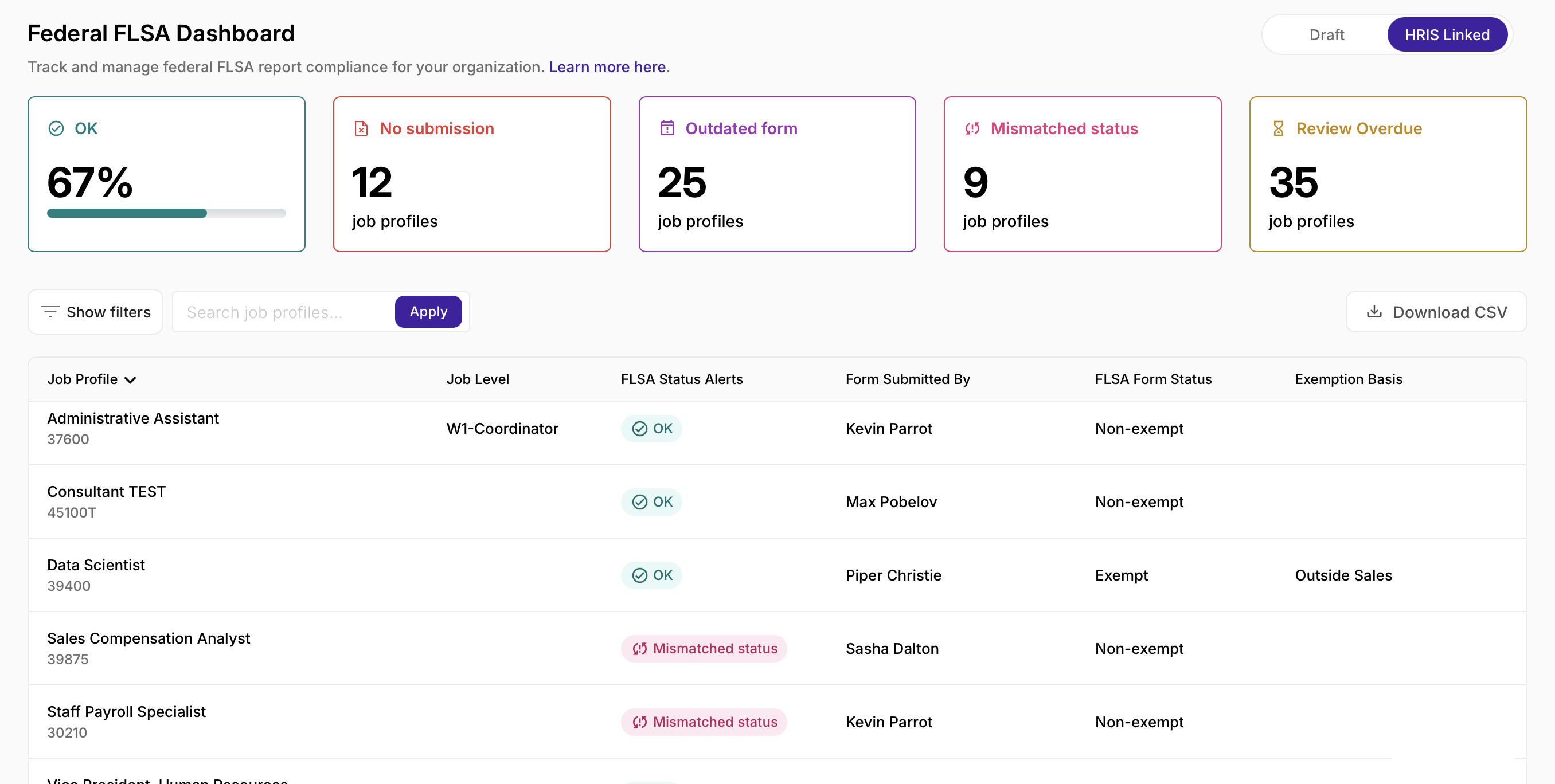
The report includes both Draft and HRIS Linked profiles, and the same alert types apply to either.
Alert types
OK
The profile's Federal FLSA status is current. There is nothing to do here.
No submission
No one has completed a Federal FLSA questionnaire for this profile yet.
To resolve it:
- Open the profile, either from the dashboard's preview panel or directly in the editor.
- Start the questionnaire: use Create New in the preview panel, or Start FLSA Questionnaire in the profile editor's FLSA sidebar.
- Complete it and submit with Submit FLSA Form.
Review overdue
A questionnaire was completed at some point, but it's older than your organization's FLSA Survey Cycle SLA (set in FLSA Survey Settings).
To resolve it:
- Check your SLA under Settings → Organization Settings → Federal FLSA (351), if you want to confirm the threshold.
- Start a new questionnaire, from Create New in the preview panel or the profile editor's FLSA sidebar.
- Submit the updated form.
Mismatched status
The exempt/non-exempt result on the questionnaire doesn't match what's recorded in your HRIS for that profile.
To resolve it:
- Compare the two: the FLSA Form Status on the dashboard versus the HRIS FLSA status.
- Figure out which one is wrong, the questionnaire, the HRIS record, or both.
- Fix the incorrect source: update the HRIS directly (outside JobNav) if that's the error, or complete a corrected questionnaire if the form result was wrong.
Note: there's no Create New button for this alert. Reconcile the mismatch first. A new questionnaire won't fix a data conflict on its own.
Outdated form
The questionnaire on file was completed using an older version of the survey.
To resolve it:
- Start a new questionnaire, from Create New or the profile editor's FLSA sidebar.
- Complete the current version and submit.
Multiple
More than one alert applies to this profile at the same time. You'll see Multiple in the FLSA Status Alerts column.
To resolve it: Click the row to open the preview panel. Each alert shows up as its own card with its own guidance. There's no fixed order, but most teams clear No submission and Mismatched status before Review overdue, since those two often affect whether the "overdue" clock is even measuring the right thing.
Quick reference
| Alert | Typical cause | Create New available? |
|---|---|---|
| OK | Profile is compliant | — |
| No submission | No questionnaire on file | Yes |
| Review overdue / Overdue | Past the FLSA Survey Cycle SLA | Yes |
| Mismatched status | Form result doesn't match HRIS | No |
| Outdated form | Old survey version | Yes |
| Multiple | Two or more alerts active | Depends on each alert |
Who can act on alerts
| Role |
Admin |
Operator |
Editor |
Viewer |
|---|---|---|---|---|
| View alerts on dashboard |
✓ |
✓ |
|
|
| Create and submit questionnaires |
✓ |
✓ |
|
|
| Change FLSA Survey Cycle SLA |
✓ |
|
|
|
Operators and Admins are the two roles that manage Federal FLSA workflows day to day. For full role definitions, see the JobNav Permissions article.
FAQs
Can a profile show up in more than one status count?
Yes. If a profile has multiple alert types, it'll be counted under each one. That's why the individual counts don't always add up to your total number of profiles.
Does the Mismatched alert apply to Draft profiles?
No since Draft profiles don't have an HRIS status to compare against, this alert doesn't apply to them.
I think an alert has been triggered incorrectly. What should I do?
Open the profile's sidebar for a closer look. If the issue is with data in your HRIS, update it there and give the next sync a chance to reflect the change.